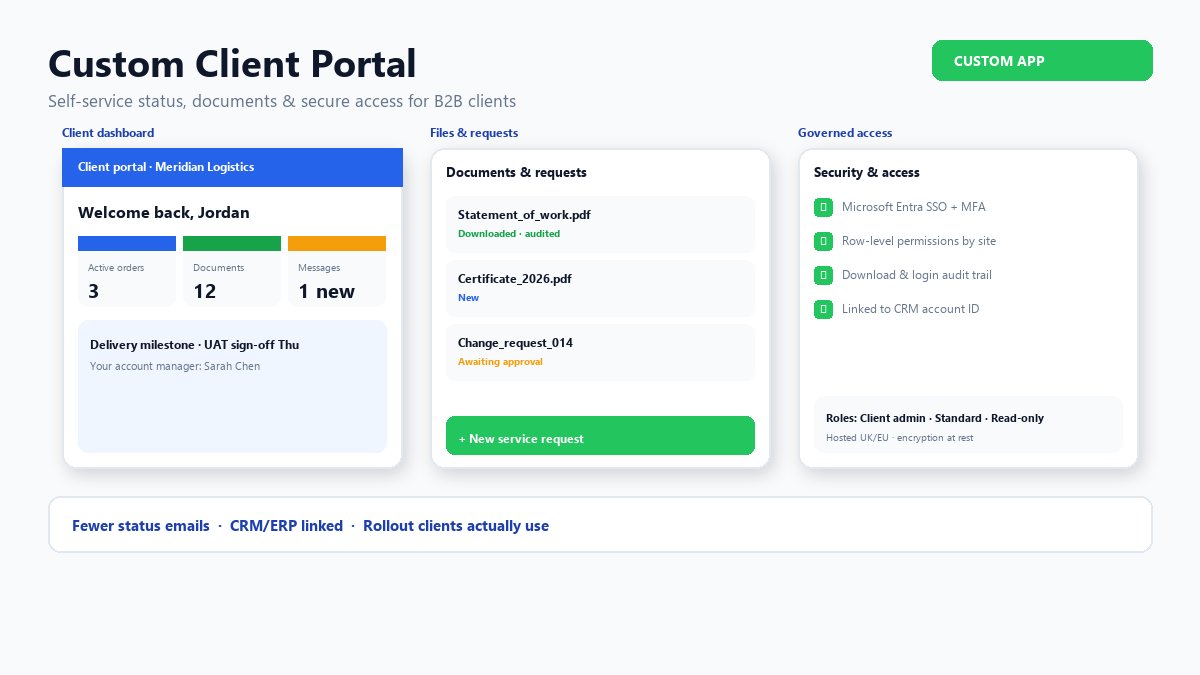
If your account managers spend hours answering “where is my order?” or emailing PDFs from shared inboxes, you are already running a portal — it is just expensive and inconsistent. A purpose-built portal replaces that hidden labour with governed self-service.
This guide helps product owners and technical leaders scope a custom application development programme for a B2B portal: what to include first, how to integrate safely, and how to roll out without adoption collapsing. For broader build decisions, see website builders vs custom development and our custom application development services.
When email and shared drives stop scaling
Portals earn their keep when several conditions appear together:
- Clients ask for the same status updates repeatedly across phone, email, and chat
- Documents are scattered across SharePoint, attachments, and personal folders
- Multiple client users need different permissions (finance vs site contact vs executive sponsor)
- Your internal systems already hold the truth — CRM, PSA, ERP, case management — but clients cannot see it
- Compliance or contract terms require audit trails on who accessed what
If only one of these is true, a lighter fix (better notifications, CRM client access licence) may suffice. When three or more apply, custom portal software usually pays back within a year through reduced support load and faster approvals.
Core capabilities — and what to defer
A focused first release typically includes:
- Authentication — email invite or SSO (Microsoft Entra, Google Workspace, SAML) with MFA where appropriate
- Account hierarchy — organisation → sites/projects → users with roles
- Primary journey status — the one thing clients care about most (delivery, case, onboarding, maintenance visit)
- Document library — contracts, reports, certificates; version visible; download logged
- Structured requests — forms that create tickets or tasks in your back office instead of free-text email
Defer until phase two unless there is a clear ROI: chat widgets, complex configurators, mobile offline mode, multi-language, and deep analytics. Use MVP vs full build thinking to keep the first release shippable in weeks, not quarters.
Permissions that mirror how clients actually work
Portal adoption fails when users see the wrong data or cannot act on what they see. Model roles explicitly:
- Client admin — manage users at their organisation, see all projects/sites they contract for
- Standard user — see assigned projects, submit requests, download permitted documents
- Read-only / executive — dashboards and summaries without operational actions
- Internal users — your staff impersonate or co-browse with audit (support and account management)
Row-level security should follow CRM or ERP account keys — not hard-coded lists that drift every quarter. Document the mapping in discovery; it is as important as UI design.
Integrate with systems of record — do not duplicate them
The portal should read and write through APIs or events to authoritative systems. Anti-patterns include:
- Storing financial or inventory truth only in the portal database
- Nightly batch sync with no visibility when it fails
- Letting users edit fields that should be controlled by internal workflow
Prefer read-optimised views for status, write-through for approved actions (approve quote, upload signed document, confirm delivery slot). For multi-system journeys, pair the portal with workflow integration so status stays consistent everywhere.
Security and compliance essentials
Client-facing software demands baseline controls from day one:
- HTTPS everywhere, secure session handling, password or SSO policy aligned to client expectations
- Encryption at rest for documents; virus scanning on uploads
- Audit log: login, document access, status changes, admin actions
- Data retention and export aligned to GDPR and contract schedules
- Penetration test or structured security review before exposing sensitive industries (finance, health, critical infrastructure)
Requirements discovery should capture client security questionnaires early — they affect hosting, logging, and identity choices. See our requirements discovery guide for workshop patterns that surface these constraints.
UX that reduces support tickets, not creates them
Good portal UX is boring in the best way: obvious next step, plain language statuses, and no dead ends.
- Use client vocabulary on labels (“Shipment” not internal code “SO-10482-FG”)
- Show what happens next and who owns it on your side
- Surface exceptions clearly — delayed, action required — with one-click request for help
- Mobile-responsive layouts; many client users check status on site
Measure success with support ticket volume on status enquiries, time-to-first-login after invite, and completion rate on self-service tasks.
Rollout: pilot, train, then expand
- Pilot cohort — one friendly client segment with high contact volume
- Parallel run — keep email path briefly while monitoring portal usage and gaps
- Playbooks — short guides for client admins and your account team (“when to nudge login”)
- Expand — add journeys (billing, assets, compliance) once core adoption holds
Assign an internal product owner on the client side and on yours. Portals without owners become stale static sites within a year.
Conclusion
A custom client portal is one of the highest-leverage forms of custom application development for B2B services: it visible to customers daily, cuts repetitive communication, and forces clarity on permissions and data flow. Scope tightly, integrate honestly with back-office systems, and treat rollout as change management — not just a go-live date.
Planning a client portal?
We help teams define MVP scope, integrate with CRM/ERP, and deliver portals that clients actually use.