If you run a growing business, you've almost certainly been told to "just use Wix" or "set up a Squarespace site." For a brochure website, a simple portfolio, or a standard online shop, that advice is often sound. The problem starts when the platform becomes your entire operating system — and you begin bending your processes around what the builder allows.
This article explains what custom application development actually delivers, how it differs from popular website builders, and how to decide which path fits your situation — without dismissing tools that genuinely work well for simpler needs.
Two different problems, two different tools
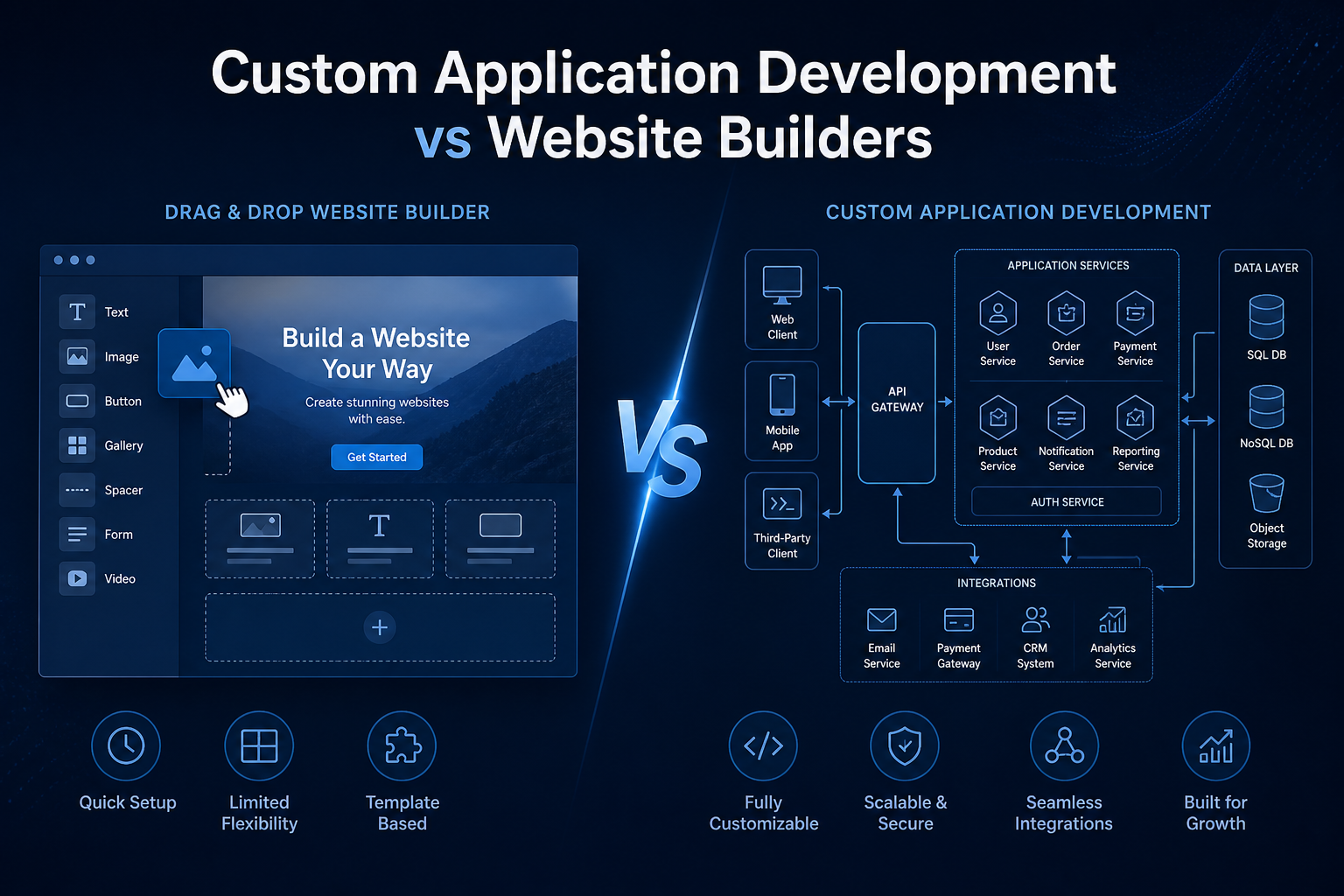
Website builders solve one problem: publish a site quickly without writing code. Custom application development solves another: build software that runs a specific part of your business.
That distinction matters because many teams conflate "we need a website" with "we need a system." A marketing site and a customer portal, an internal workflow tool, or a multi-step quoting engine are not the same thing — even if they all appear in a browser.
What website builders are designed for
- Brochure sites, portfolios, and landing pages
- Template-based design with drag-and-drop editing
- Basic contact forms, booking widgets, and simple e-commerce
- Getting online fast with minimal technical overhead
What custom application development delivers
- Software shaped around your workflows, roles, and data model
- Deep integrations with CRM, ERP, finance, and legacy systems
- Complex business logic — approvals, pricing rules, multi-stage processes
- Internal tools, client portals, dashboards, and operational systems
- Code, architecture, and infrastructure you own and can evolve
At Archanis, custom application development covers the full delivery lifecycle: discovery workshops, UX and information architecture, API design, secure build and test, deployment, monitoring, and ongoing support. Typical outputs include internal tools, customer-facing portals, workflow systems, operational dashboards, and line-of-business applications — not just pages with a contact form.
Custom development vs website builders at a glance
| Dimension | Custom application | Website builder (Wix, Squarespace, etc.) |
|---|---|---|
| Primary purpose | Run business processes and workflows | Publish content and simple interactions |
| Flexibility | Built to your exact requirements | Limited to platform features and templates |
| Integrations | Tailored APIs to your stack (CRM, ERP, finance) | App marketplaces and basic connectors |
| Data model | Designed around your domain | Fixed structures (products, pages, forms) |
| Time to launch | Weeks to months depending on scope | Hours to days for a basic site |
| Up-front cost | Higher — discovery, design, engineering | Low — subscription and templates |
| Long-term ownership | You own the code, data, and hosting choices | Platform lock-in; export options are limited |
| Scalability | Architected for growth, load, and complexity | Platform limits on traffic, SKUs, automation |
| Best fit | Differentiating workflows, portals, operations | Marketing sites, simple shops, quick presence |
Platform-by-platform: what each builder does well — and where it stops
Not all website builders are the same. Understanding each platform's sweet spot helps you see why custom development becomes necessary as complexity grows.

Wix
Strengths: Huge template library, drag-and-drop editor, App Market for add-ons (booking, chat, forms), reasonable for small business brochure sites.
Limits: Complex data relationships, bespoke user roles, and multi-system integrations are awkward. Heavy custom logic often means workarounds with third-party apps — each adding cost and fragility. Performance can suffer on content-heavy or highly customised sites. Migrating off Wix later is painful.
Custom development wins when: You need a client portal, approval workflows, or CRM-synchronised operations that Wix apps cannot model cleanly.

Squarespace
Strengths: Polished templates, strong aesthetics for creatives and service businesses, built-in scheduling and basic commerce, straightforward content management.
Limits: Less extensible than Wix for third-party integrations. Limited options for complex product catalogues, B2B pricing, or custom checkout flows. Developer access exists but is constrained compared to a full codebase.
Custom development wins when: Your service business needs configurable quoting, contract management, or operational dashboards beyond what scheduling and forms can handle.

Hostinger Website Builder
Strengths: Low cost, bundled with hosting, fast setup for simple sites, AI-assisted page generation for beginners.
Limits: Primarily a hosting company's add-on — fewer integrations, less mature ecosystem, and limited headroom for growth. Suited to very simple presence sites, not operational software.
Custom development wins when: You've outgrown a basic Hostinger site and need proper application architecture, not just a nicer template.

Shopify
Strengths: Best-in-class for standard e-commerce: product catalogues, payments, inventory, shipping integrations, and a large app ecosystem. Excellent if you sell products online through a conventional shop model.
Limits: Shopify is a shop platform, not a general application platform. B2B workflows (tiered pricing, account-specific catalogues, quote-to-order, complex approvals), heavy customisation of checkout, and deep ERP integration often hit platform boundaries or require expensive Plus-tier workarounds.
Custom development wins when: E-commerce is one channel in a broader operational system — for example, when orders must flow into manufacturing, field service, or finance systems with rules Shopify cannot encode natively.

GoDaddy Website Builder
Strengths: Domain and hosting in one place, quick setup, marketing tools bundled, familiar brand for non-technical owners.
Limits: Template-driven with minimal extensibility. Integrations and automation are basic. Often chosen for speed, then replaced within 1–2 years as requirements grow.
Custom development wins when: The GoDaddy site was a starting point, but the business now needs authenticated areas, role-based access, or system integrations.

Carrd
Strengths: Extremely fast for single-page sites, landing pages, and link-in-bio style pages. Very low cost.
Limits: Deliberately minimal — one page, basic forms, no real application logic. Not a platform you grow into; it's a platform you graduate from.
Custom development wins when: A Carrd landing page validated demand, and you now need a full product, portal, or workflow behind it.

Google Sites
Strengths: Free, integrates with Google Workspace, easy for internal documentation and simple team pages.
Limits: Very basic design options, no e-commerce, limited forms and automation, not suitable for customer-facing brand experiences or complex applications.
Custom development wins when: Internal tools or client-facing systems need proper authentication, audit trails, and integration beyond Google's ecosystem.
Why custom application development is better — for the right problems
Custom development is not "better" in every situation. It is better when the software needs to reflect how your business actually works, rather than forcing your team to adapt to a template.
1. Your workflows are the product
If quoting, onboarding, job scheduling, or compliance steps involve conditional logic — "if this client type, use this approval chain" — website builder widgets break down quickly. Custom applications encode those rules explicitly, with tests and documentation.
2. Integration is not optional
Most growing businesses run on a patchwork of CRM, accounting, email, and legacy tools. Website builders offer connectors; custom development offers designed integrations — synchronised data, event-driven updates, and error handling that survives production use. See also our Integration & Automation service for complex cases.
3. You need proper roles and permissions
Builders typically offer admin vs editor. Custom apps support fine-grained RBAC: clients see their data only, managers approve within their region, auditors read but cannot edit. That matters in B2B, regulated sectors, and multi-team operations.
4. You own the asset
With a builder, you rent capability on someone else's platform. Price increases, feature removals, or policy changes are outside your control. Custom software — hosted on infrastructure you choose — is an asset that can be maintained, extended, or migrated.
5. Performance, security, and compliance by design
Custom development applies secure-by-design patterns, automated testing, logging, and monitoring from the start — not bolted on through third-party plugins. For organisations with GDPR obligations, audit requirements, or customer security questionnaires, that difference is material.
6. Total cost of ownership at scale
Builders look cheap until you stack premium plans, paid apps, transaction fees, and the hidden cost of manual workarounds. A well-scoped custom build often delivers lower long-term TCO when the alternative is fifteen SaaS subscriptions held together with spreadsheets.
When a website builder is genuinely the right choice
Honest advice matters. Stay on Wix, Squarespace, or similar if:
- You need a marketing site or simple shop live this week
- Your processes fit standard templates with minimal customisation
- You have no integration requirements beyond basic forms and payments
- Budget is tight and traffic or transaction volume is low
- You don't yet know what workflow you need — use a builder to learn, then build properly
For many SMEs, our Website Support service is the sensible middle ground: stay on your builder, but get professional help with maintenance, content, SEO, and forms — without jumping straight to a full custom build.
Seven signs you've outgrown a website builder
- Spreadsheet bridge: Staff export data from the site and re-enter it elsewhere daily.
- App marketplace dependency: Critical features rely on a chain of third-party plugins that break each other.
- Workarounds as policy: "That's just how we do it in Wix" becomes a phrase in team meetings.
- Customer confusion: Clients can't self-serve because the site can't show their account-specific information.
- Performance or SEO ceiling: You've optimised content but the platform's structure limits speed or technical SEO.
- Security questions you can't answer: Prospects or auditors ask about data handling and you rely on the vendor's generic FAQ.
- Migration fear: You avoid changing anything because moving off the platform feels impossible.
If three or more of these resonate, it's worth a discovery conversation — not necessarily a full rebuild on day one, but a phased plan that might start with one high-value workflow.
How custom application development works in practice
A common misconception is that custom development means a risky, year-long project with no visibility. Modern delivery looks different:
- Discovery workshops — map workflows, define MVP scope, prioritise by business value
- UX and architecture — user journeys, data model, API design before heavy build
- Incremental delivery — frequent demos, small releases, feedback loops
- Definition of Done — tested, secure, documented, deployable
- Production readiness — monitoring, logging, and support pathways from launch
Many organisations start with a focused MVP — one portal, one workflow, one dashboard — and expand once value is proven. That approach often costs less than years of premium builder plans plus operational friction.
Hybrid approach: the path most businesses take
You don't have to choose all-or-nothing. A practical pattern we see often:
- Keep Squarespace or similar for marketing content — it works fine for blogs and brand pages.
- Build custom for the operational core — client portal, quoting engine, internal dashboard.
- Integrate both — marketing site links to the app; shared branding; single sign-on where needed.
This gives you speed where templates help and control where your business differentiates.
Conclusion: match the tool to the job
Website builders like Wix, Squarespace, Hostinger Website Builder, Shopify, GoDaddy Website Builder, Carrd, and Google Sites have democratised getting online. That is genuinely valuable. But they are not substitutes for custom application development when your software needs to run workflows, integrate systems, and scale with your operations.
The right question is not "Which is better?" but "What problem am I actually solving?" If it's presence and simple transactions, use a builder. If it's operational software that shapes how you deliver value to customers, build it properly — with discovery, architecture, and engineering practices that hold up in production.
Outgrowing your website builder?
We help businesses assess whether to extend, integrate, or replace DIY platforms — and deliver custom applications when building is the right call.