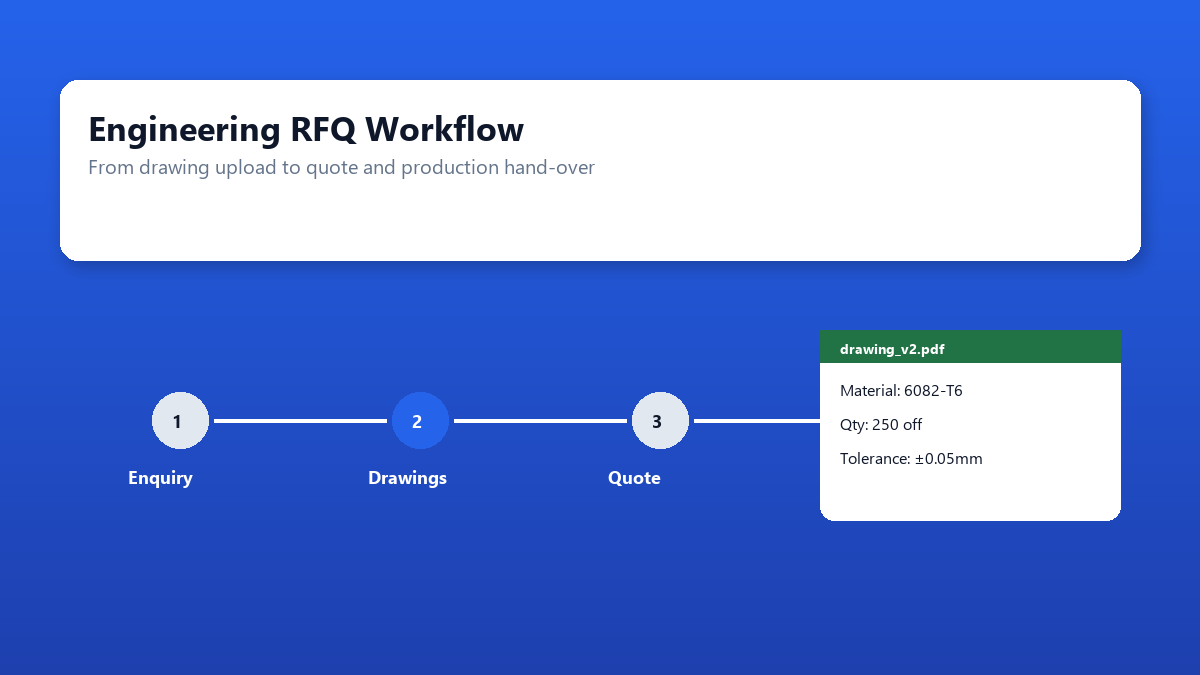
A customer sends a PDF drawing by email. Sales notes the quantity on a sticky note. The estimator opens a DXF from a previous thread, not realising a revised drawing arrived yesterday. The quote goes out with the wrong material grade, and nobody notices until production flags a mismatch. This is not a people problem — it is a workflow problem.
Precision engineering firms, fabrication shops, and sheet metal manufacturers handle dozens of RFQs each week. Each enquiry carries drawings, tolerances, finish requirements, and commercial terms that must survive hand-offs between sales, estimating, and the shop floor. When those details live in scattered channels, quotes take longer, margins erode, and won jobs start with incomplete information.
This article walks through why RFQ workflows break down, what to capture on every enquiry, the quote stages that need visibility, and a phased approach to fixing the process — whether you stay in spreadsheets or move to custom software.
Why RFQ workflows break down
Most engineering firms do not lack process documentation. They lack a single place where the process actually happens. RFQ details arrive through multiple channels — email, phone, web forms, customer portals, and walk-in enquiries — and each channel stores information differently.
Scattered intake channels are the first problem. A sales rep logs an enquiry in a shared inbox while the estimator works from a folder on a network drive. Clarification questions bounce between email threads, and the answers never make it back to the master record. By the time a quote is sent, the version of the drawing used for costing may not match what the customer expects.
Drawing version control causes repeated rework. Customers send PDF for review, DXF for nesting, and STEP files for machining — often in separate emails days apart. Without a clear "current revision" on each job, estimators quote against outdated geometry or miss engineering changes that affect material and cycle time.
Estimator vs sales hand-offs create gaps. Sales captures the commercial context — delivery urgency, relationship history, competitive pressure — while estimators hold the technical detail. When these sit in separate systems or people's heads, quotes go out without the context needed to win, or with assumptions the customer never confirmed.
No pipeline visibility means managers cannot see where quotes stall. Enquiries sit in "estimating" for a week with no escalation. Clarification requests go unanswered because nobody owns the follow-up. Won/lost data is never captured, so the business cannot learn which enquiry types convert or where bottlenecks form.
What to capture on every enquiry
Standardising intake is the highest-impact fix you can make without buying software. Every RFQ — regardless of channel — should capture the same core fields before estimating begins:
- Drawings — PDF for review and approval; DXF or STEP for programming and nesting. Record the revision number and date on each upload
- Material specification — grade, thickness, coating, and any customer-supplied material requirements
- Quantity — initial order quantity, repeat order potential, and any volume breaks the customer expects
- Tolerance and inspection requirements — general tolerances, critical dimensions, CMM or first-article inspection needs
- Finish and secondary operations — deburr, powder coat, anodise, assembly, packaging, and labelling
- Delivery date and incoterms — required date, partial shipment acceptance, and shipping responsibility
- Customer reference — PO number, project code, or internal job reference for traceability through production
A simple intake form — even a structured email template or shared spreadsheet — reduces the back-and-forth that delays quoting. The goal is that an estimator can open one record and have everything needed to cost the job without chasing sales or the customer.
Quote stages that need visibility
Treating RFQs as a pipeline rather than a series of one-off tasks gives managers control over throughput and response times. These stages cover most precision engineering quote workflows:
- Received — enquiry logged with drawings attached and core fields complete
- Estimating — assigned to an estimator with a target turnaround date
- Clarification — questions outstanding with the customer; track who asked and when
- Sent — quote issued with version, validity period, and commercial terms recorded
- Won / lost — outcome captured with reason code (price, lead time, capability, no response)
- Hand-over to production — won quote transferred with approved drawings, BOM, routing notes, and customer PO
Visibility does not require complex software. A shared status column in a tracker, updated at each transition, is enough to start. What matters is that every enquiry has a current status, an owner, and a timestamp — so nothing sits invisible for days.
The hand-over stage is where many workflows fail silently. Production receives a job number and a folder of drawings, but the quote assumptions — material substitution allowed, tolerance interpretation, agreed delivery — never travel with it. Building a structured hand-over checklist, linked to the original quote record, prevents costly surprises on the shop floor.
When spreadsheets still work — and when to build custom software
Spreadsheets remain a reasonable tool for RFQ tracking when enquiry volume is low, a small team handles intake and estimating, and drawing files can live in a well-organised folder structure with clear naming conventions. A shared Excel or Google Sheet with status columns, linked drawing paths, and basic validation covers many shops under 20–30 RFQs per week.
Custom software becomes worth considering when:
- Multiple estimators work concurrently and overwrite each other's records
- Drawing uploads need version control, preview, and approval workflows
- Quotes must integrate with ERP or MRP for automatic job creation on win
- Customers expect a portal to submit RFQs and track quote status
- Reporting on win rates, turnaround times, and estimator workload is business-critical
- Compliance or quality standards require audit trails on every change
Our guide on when to replace Excel with custom software covers the decision criteria in detail. For engineering firms, the trigger is usually a combination of volume growth and integration needs — the spreadsheet works until it becomes the bottleneck.
A free Excel POC lets you validate a custom quote management workflow against your actual RFQ data before committing to a full build. See our Excel to web application case study for how one manufacturer made that transition.
A phased improvement approach
You do not need to replace everything at once. Most firms see measurable improvement within weeks by working through these phases:
Phase 1 — Standardise intake. Create a single enquiry form (email template, web form, or PDF) with the fields listed above. Train sales and reception to use it for every channel. Reject incomplete enquiries politely — "We need the drawing revision and quantity to quote accurately" — rather than chasing details ad hoc.
Phase 2 — Centralise drawings. Move from email attachments to a shared location — a network folder with a naming convention, or a cloud drive with job-number folders. One drawing repository per enquiry, with revision suffixes, eliminates the "which file did we quote?" problem.
Phase 3 — Status dashboard. Add pipeline visibility with a shared tracker showing every open RFQ, its stage, owner, and age. Review weekly in a 15-minute stand-up: what is stuck, what needs escalation, what is waiting on the customer.
Phase 4 — Integrate with ERP/MRP. When won quotes are re-keyed into production systems by hand, errors and delays follow. Integration and automation can push approved quote data — part numbers, quantities, routing, customer PO — directly into your ERP or MRP, with drawings attached to the job record.
Each phase delivers value independently. Firms that stop after Phase 2 often cut quote turnaround by 30–40% without any software investment. Phases 3 and 4 matter most as volume and team size grow.
When the spreadsheet reaches its limits, custom application development can build a quote management system tailored to your estimating methods, drawing formats, and production hand-over — without forcing your process into a generic SaaS product.
Conclusion
RFQ and drawing workflow problems in precision engineering are rarely about capability — they are about information getting lost between channels, people, and systems. Fixing the workflow starts with standardising what you capture, making quote stages visible, and ensuring production receives what was actually quoted.
Spreadsheets and shared folders handle this well at modest scale. As enquiry volume, team size, and integration requirements grow, custom quote software becomes the rational next step — built around your estimating logic, not a generic template. Either way, the firms that respond fastest with accurate quotes win more work. Getting the workflow right is how you get there.
Struggling with RFQ and quote workflows?
We help precision engineering and manufacturing firms design RFQ intake, quote tracking, and production hand-over — from spreadsheet improvements to custom web applications.